Investigations 101
Last updated: May 28, 2025
The Investigations feature introduces a flexible workspace for organizing and saving workflows in Seamless Horizons. It’s designed to support both individual and collaborative investigations, allowing users to save search queries, bookmark results, and revisit findings across sessions. This marks a shift from single-session work toward continuity and structured analysis.
Core Features
Save searches and results, organize them into folders
Import CSVs of search terms for bulk search
Instantly preview bookmarked results from past investigations
Share investigations with groups for collaborative work
Duplicate or export investigations as needed for handoff or reporting
What the Investigations workspace Offers
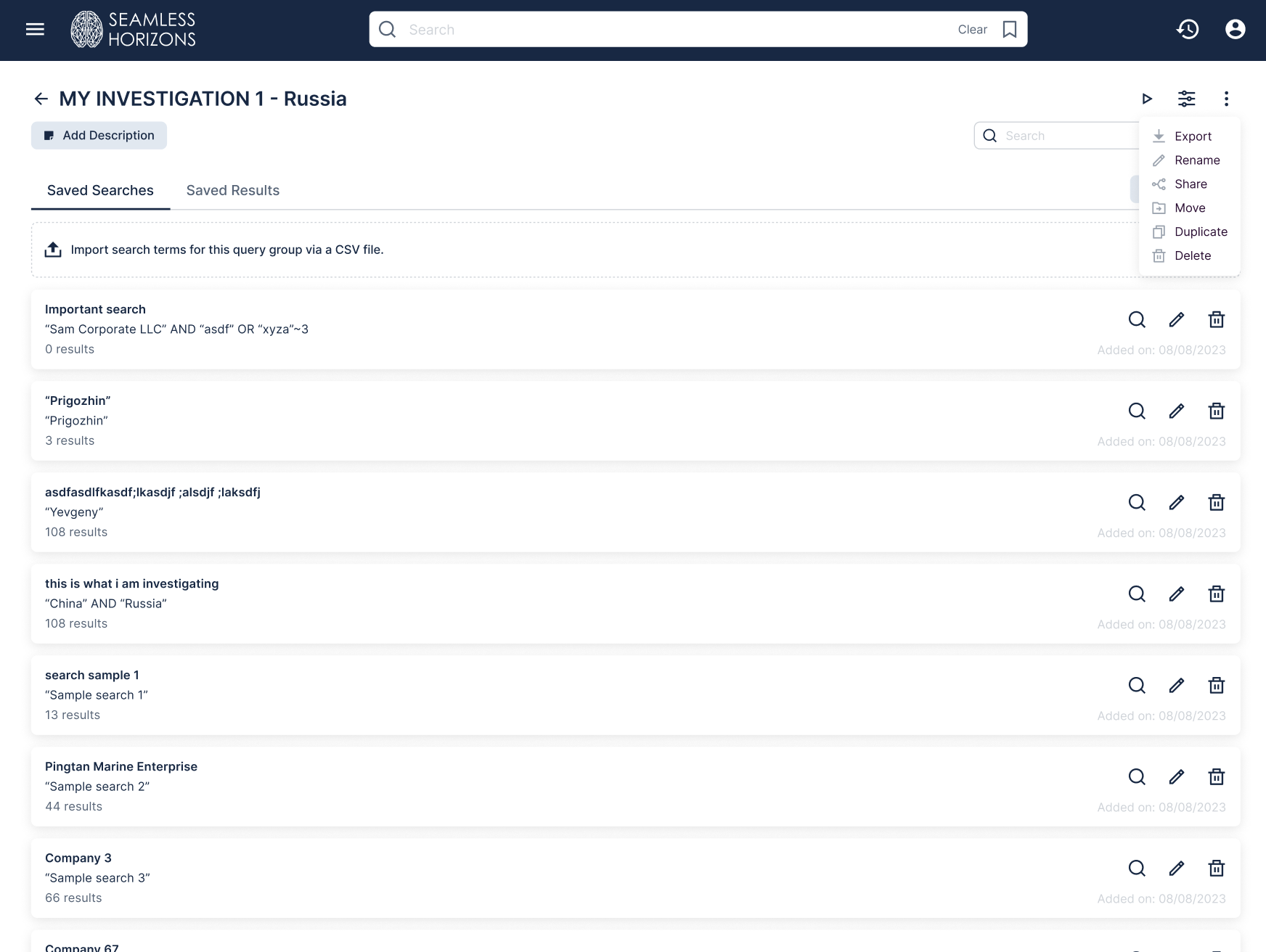
At its core, the dedicated Investigations workspace is a centralized space for saving and structuring search-related work. It supports:
Creating standalone investigations or organizing them into folders
Custom naming of folders, investigations, saved searches, and bookmarked results
Adding high-level descriptions to investigations to provide context
Searches can be built incrementally. For instance, it's possible to start with a single query or upload a CSV of terms, useful for bulk searching queries. Even without saved search queries or results, filters can be applied to an investigation to set an initial focus, which can later be referenced during broader search activities.
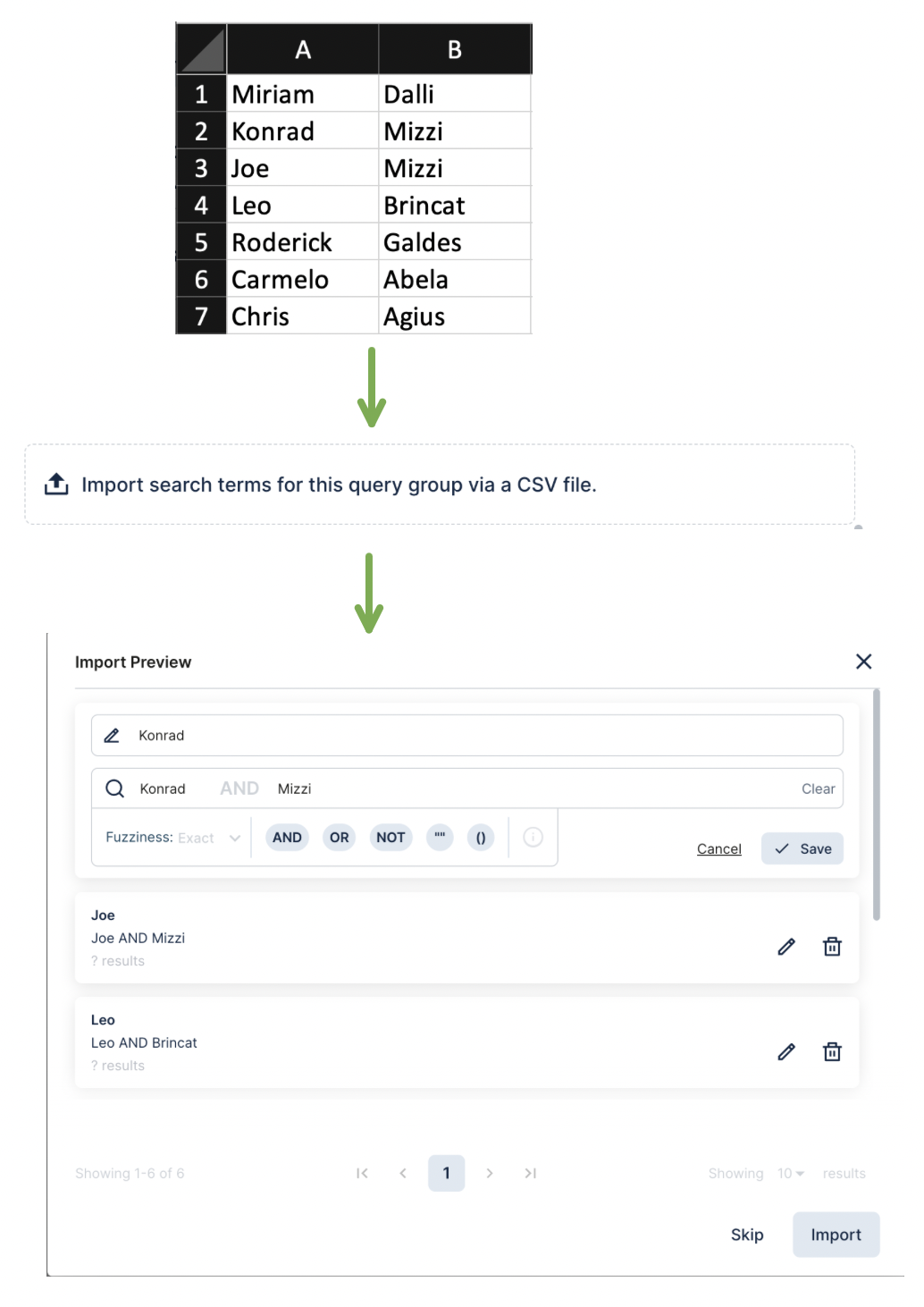
CSV BULK Import: Import a list of terms through the Import section inside an investigation.
If a row contains multiple values (e.g. name, company, country), Horizons treats them as part of the same search and combines them using an AND operator. You’re able to edit these individually if needed
Any bookmarked file can be opened instantly from an investigation, without rerunning the original query. This makes it easy to return to earlier findings without repeating steps. Additionally, Investigations can also be duplicated, moved, deleted, exported, or shared with other user groups, making them suitable for both solo use and collaborative settings.
Managing Investigations
Each investigation includes options for managing from the actions menu in the top-right of the page. These tools support reorganization, cleanup and handoff.
Export | Investigations can be exported locally for offline reference or documentation. |
Share | Share the investigation with other users. Access is only granted if recipients have permission to view all the relevant datasets |
Duplicate | Creates a copy of the investigation with all current contents and settings |
Move | Reorganizes the investigation into a different folder |
Delete | Permanently deletes the investigation. No recovery available |
Note: Investigations Export downloads as a ZIP file which includes:
An Excel file that includes a table of contents and lists all saved search queries and the corresponding files that were found
All saved results source files (documents or files bookmarked as part of the investigation)
Investigations Throughout Seamless Horizons
Investigations are not limited to the dedicated workspace view. Bookmarks can be created throughout Seamless Horizons:
From the main search bar, every search term can be saved directly into an existing investigation or spun off into a new one
On the search results page, individual files can be bookmarked into a chosen investigation with one click
The Recent Searches widget also supports saving past queries into new or existing investigations
A data dictionary page (which provides metadata about a dataset and its origin) can also be saved into an investigation as a reference or high-level filter
This flexible bookmarking design ensures investigations can be built passively, as part of normal search activity, rather than requiring dedicated setup time.
Using Investigations During Search
Once investigations have been created, they also appear alongside the platform’s filter panel. This allows past work to remain accessible even during new research tasks.
Instead of interrupting a session to locate earlier findings, a user can reference prior terms, files, or filters in-line. This reduces cognitive overhead, and supports workflows where revisiting and cross-referencing older material is essential.
Why This Matters
Investigations isn’t just about saving searches, it’s also about bringing structure.
Search terms and results can be grouped into organized investigations or folders, making it easy to return to work across sessions without starting over. This is especially important for longer-term projects, where work builds over time.
For teams, Investigations helps reduce duplication. Instead of sending files back and forth or re-running the same searches, users can share an investigation that includes saved queries, results, notes, and filters in one place. Everyone sees the same context, and collaboration stays aligned.Whether the goal is screening, discovery, or reporting, Investigations feature supports a structured and reusable approach, rooted in how analysts, journalists, and researchers actually work.